The intuitive mind is a sacred gift and the rational mind is a faithful servant. We have created a society that honours the servant and has forgotten the gift. Albert Einstein
The two smallest and lightest lenses in the GFX lens lineup are the 50 and 63mm lenses. One is always wondering whether I can get a smaller lens for travelling? If I can, what are the compromises in image quality, given the amazing quality of most Fujifilm GFX lenses?
So here is a quick gallery of third-party lenses taken from the B&H site that appear to be much smaller, I have not included the larger lenses:
The newer Dual Gain Output (DGO) sensors that are found in Canon, Sony and Panasonic cameras, as advertized, move the camera’s dynamic range from 12 to 16 stops; the old Dual Conversion Gain (DCG) sensors move the range from 12 to 13-13.5 stops. What is often not advertised is that this dynamic range is not constant and changes as the camera’s ISO is increased. In addition, because mirrorless cameras have both a mechanical and an electronic shutter, the dynamic range varies depending on which shutter you use. Keep in mind that the differences are subtle, and they may not be noticed by most photographers.
Feature
DGO (Dual Gain Output)
DCG (Dual Conversion Gain)
How it Works
Simultaneously reads each pixel at two different amplification levels (high and low) for a single exposure.
Switches between two different ISO “circuits” or gain paths (High and Low) depending on the lighting.
Best Used For
Low ISO settings and mechanical shutters to achieve maximum dynamic range (often ~1 stop improvement).
High ISO performance and electronic shutters; it is more “consistent” across different shooting modes.
Common Devices
High-end cinema cameras like the Canon C300 Mark III and newer 2026-era flagship sensors.
High ISO performance and electronic shutters make it more “consistent” across different shooting modes.
The DCG sensor, although its dynamic range is more limited, will have less noise in the shadows and is not negatively affected by switching to an electronic shutter at various ISOs. When using a mechanical shutter, however, it can be less effective in some low-light situations. The DGO sensor at base ISO preserves detail in both shadows and highlights with its broader dynamic range; however, it can lose that advantage when switching to an electronic shutter or increasing ISO.
RAW processors operate in very different ways, and when you are looking at the initial RAW file, there can be quite a difference. I have found that this initial look and feel can affect how I begin to process and imagine. In addition, the integrity of the original file also affects the extent to which one can manipulate dynamic range and colour. The following is a non-scientific exploration of three prominent software programs, their original RAW outputs, and the resulting images. Keep in mind that I was not trying to make them all look the same; rather, I followed a similar process with each one, but kept the adjustments modest.
Processing the Images
The images below are RAW files from each program; the following images have had their exposure increased by 1.4 stops in Lightroom, as I often underexpose images. If you look at the upper left-hand corner, you can see which program the images are from; if you click the image, it should enlarge.
All three RAW editors appear to treat kelvin and contrast differently. This means that, as I process, I have a different starting point for temperature, sharpening, contrast, colour, etc. One could readily make the mistake at this point of concluding that one of the unprocessed RAW images is superior to the others. This may not, however, be the case once you start processing each image in its respective program.
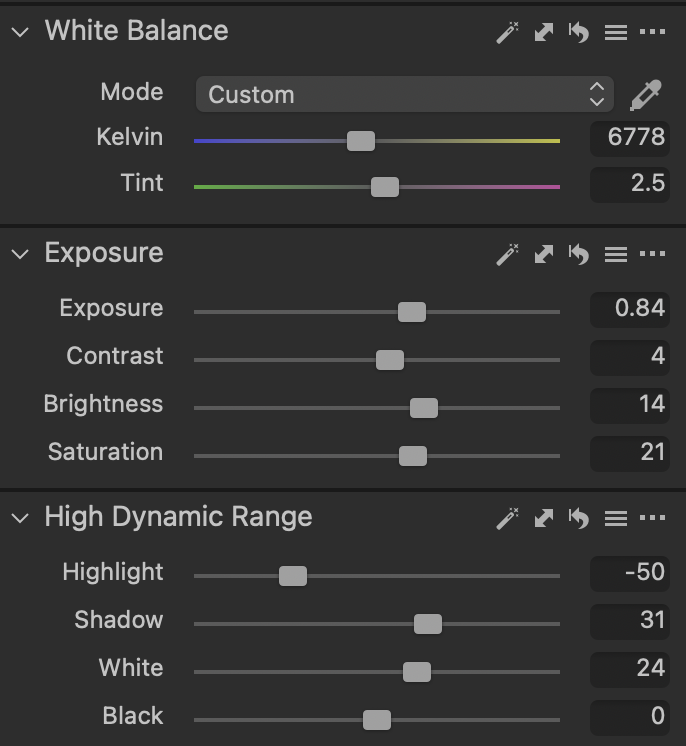
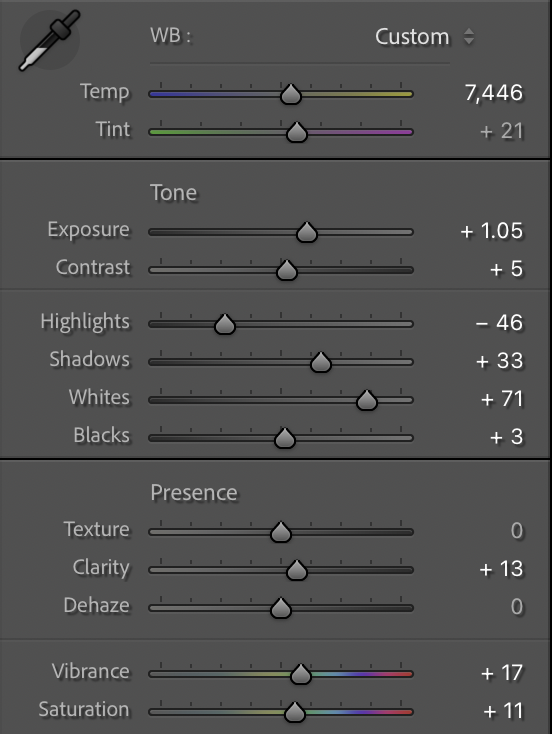
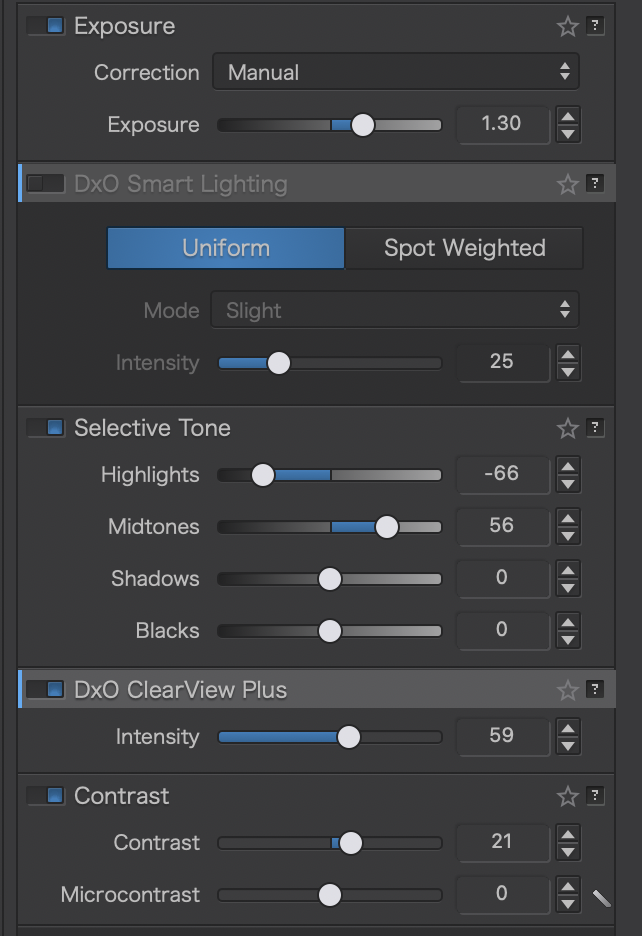
The first thing you will notice when you open each programme is that the basic processing sliders are similar but not identical. During the processing, you will also discover that they do not adjust the image in in the same way. For example, Capture One’s approach to contrast differs markedly from Lightroom’s. Lightroom uses the Tone and Presence sliders; in Capture One, the primary sliders are Exposure and High Dynamic Range; and in DXO, the primary sliders differ again. You can see the difference below. The sliders on the left are Capture One; in the centre are Lightroom and DXO PhotoLab on the right. This makes it difficult to process the images in the same manner, thereby rendering this discussion highly subjective. This is especially true when you start with RAW files that also look quite different.
In addition to differences in processing tools, I observed slight differences in how they interpret and correct lens problems, and in file size. The images below have been processed, only slightly, using similar adjustments. I avoided larger adjustments that would be needed to make them more similar. More dramatic processing would be possible and could create an even greater difference.
Details of the Processed Files
Increasing the magnification to 1000 percent shows a significant difference between the three RAW processing engines. At this magnification, you can see differences in artifacts, edge contrast, and detail preservation. At this magnification, you will notice that the post changes position, despite Lightroom focusing on the same point in the image. This may indicate a flaw in Lightroom or a difference in how the RAW processor handles lens correction or the RAW file. I will leave that upto others to interpret.
After examining these three files, it appears that the process produced more artifacts in the Lightroom file than in the other two images. It may be that some sharpening occurred in the background when the RAW file was produced. It is also likely that some automatic sharpening has occurred in all three programs, but with different effects.
A Comparison of DXO Pure RAW and Lightroom X-Tran Image
The examples above were applied to a Bayer-filtered image, but what would the outcome be with an X-Tran Filter? The image below shows the difference between the two RAW processors after applying the same adjustments to the image. Once again, you can click on the image to enlarge it.
Conclusion
The decision about which option is most desirable is subjective, but I would avoid processing Lightroom RAW files. These results, of course, will differ because Canon, Sony, Nikon, and Fujifilm have different ways of interpreting signals from their sensors. There are, of course, different sensors as well. In addition, I suspect that advanced processing techniques would provide further insight into the integrity of the RAW files and their ability to withstand a given editing style. Each photographer would have to experiment to determine which produces the best results for their cameras.
Implications for workflow if you use Lightroom
DXO Pure RAW processing, when used as a Lightroom plugin, facilitates a simpler workflow than importing a Capture One TIFF file back into Lightroom. With the DXO RAW file, you will have two RAW files: the original camera RAW file processed in Lightroom and also the DXO Pure RAW DNG. Capture One, by contrast, only allows you to export the file as a TIFF or PSD, which is then synchronized back into Lightroom. It is more likely that anyone using Capture One and Lightroom together would process all images in Capture One before synchronizing them back into Lightroom.
Other Photographers Observations
There are other considerations, when choosing a processor such as ease of use, specific tools that are key to your personal style, speed, etc. Paolo Satori has an interesting perspective in this regard. He was drawn to Capture One as he felt it had superior RAW processing, advanced colour control, and layer-based local adjustments. Then switch back to Lightroom because of recent developments in noise reduction, masking, and the simpler interface. He qualifies this by noting that he will miss the full layer-based local adjustments and advanced colour editing.
AI summary for what is worth suggests the following: AI summary for what is worth suggests the following: DxO excels at pure image processing (noise reduction, lens corrections), Lightroom offers the best all-in-one workflow with superior organization and cloud sync, while Capture One provides unparalleled colour control, superior tethering, and professional colour grading, though it’s pricier and less intuitive for beginners. Choose DxO for maximizing detail, Lightroom for broad management, and Capture One for studio/fine-art control.